

Caregiver Payment Guide (AFC Program)
This procedure applies after both the Senior and the Caregiver have been approved for the AFC program and received Prior Authorization (PA) from MassHealth or CCA.
1. 💰 Payment Cycle
The payment process at Clare Senior Care is divided into two distinct phases:
A. First Payment Cycle (Initial Month)
The Start Day of the first Payment Cycle is the SOC (Start Of Care) Day.
This first payment cycle is longer due to the initial processing requirements with the insurance company:
- Delay Reason: After the first month of care ends, Clare Senior Care requires a processing period (typically one month) to submit the payment file (Claim) to the corresponding insurance agency (MassHealth/CCA) and receive the funds.
- Time to Receive Payment: Due to this Claim processing time, the Caregiver’s first payment is usually received approximately 2 months from the Care Start Date.
Example: If the care start date is January 1st (Month 1), the payment for January will be received around the beginning of March.
B. Subsequent Payment Cycles (From the second month onward)
- Standard Cycle: For all subsequent months of care, provided there are no issues or delays from the insurance company (MassHealth/CCA) and the Caregiver has completed all required paperwork on time, the payment cycle will occur at the end of the care month (or immediately following the close of the care month).
2. 📧 Monthly Payment Confirmation (The Quote)
After completing their monthly care obligations, the Caregiver must follow these steps to confirm their compensation:
| Step | Detailed Description |
| A. Complete Paperwork | The Caregiver must ensure that all required documents, logs, and forms requested by Clare Senior Care for that month of service are fully completed and submitted. |
| B. Receive Quote Email | Clare Senior Care will send a monthly Email containing the “Quote” (Payment Confirmation/Statement). |
| C. Review the Quote | The Quote will clearly show: * The Total Number of Days the Caregiver provided service. * The Daily Compensation Rate based on the Senior’s Care Level (Level 1 or Level 2). |
| D. Respond to the Quote | The Caregiver must log into the online portal (link provided in the Email) and either: * ✅ Accept: If the number of days and amount shown are correct. * ✍️ Comment: If the Caregiver notices any discrepancy in the days of service. The Clare Team will respond and make necessary adjustments as soon as possible. |
3. Portal Login and Quote Handling Instructions
This is how you access and manage your monthly Quote using the secure online portal (powered by Zoho Books):
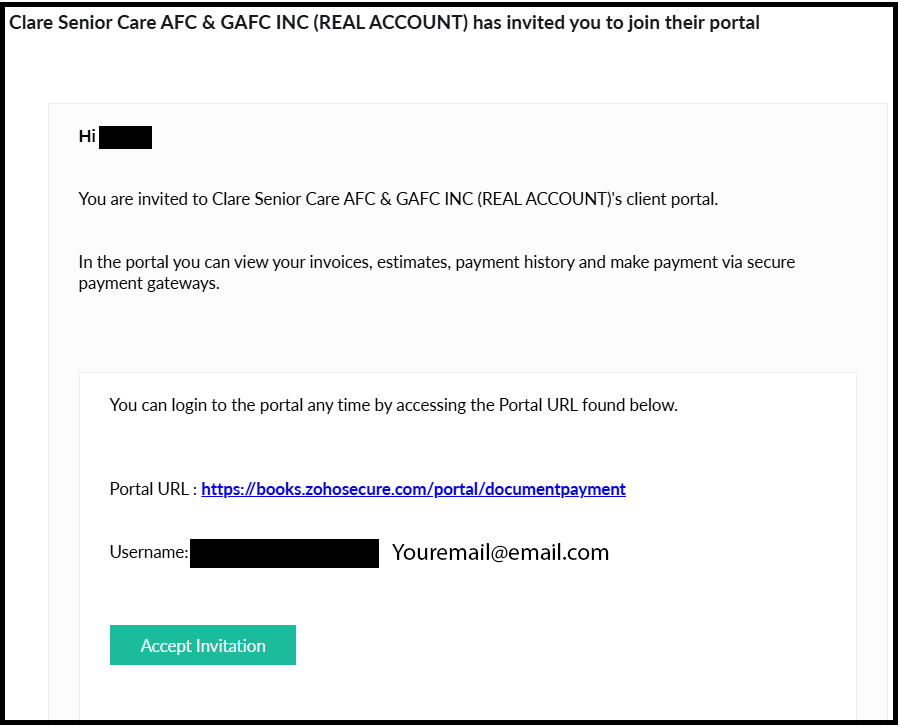
Step 1: Open the Invitation Email
You will receive an invitation email from Clare Senior Care (powered by Zoho Books) to access the client portal.
Click the “Accept Invitation” button within the email to proceed.
Step 2: Set Up Your Password
Create a secure password for your portal account. It is crucial to remember this password, as you will need it every month to check and approve your Quotes from Clare.

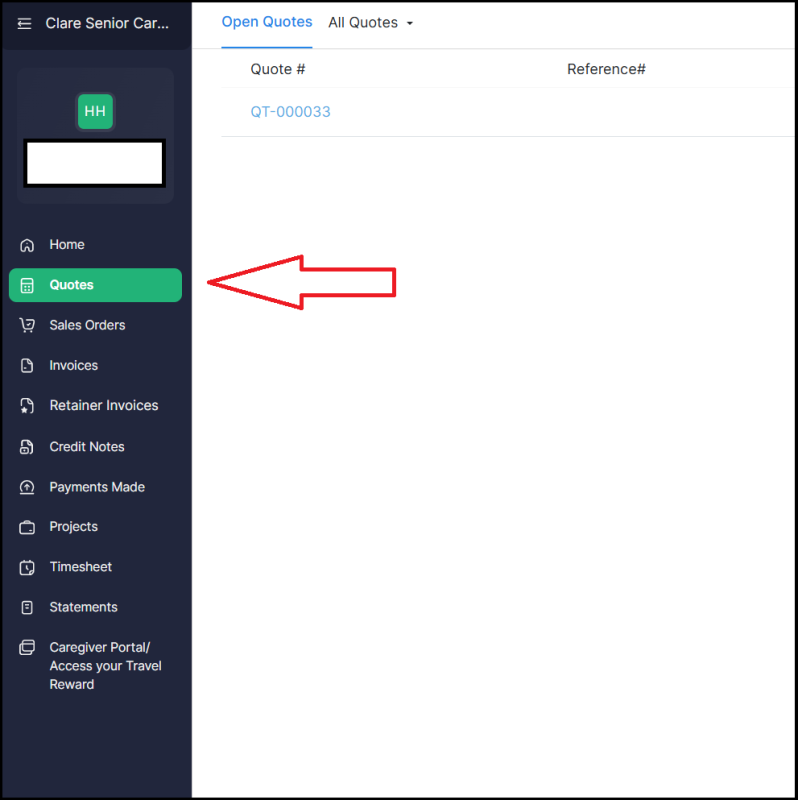
Step 3: Access the Portal
After setup is complete, you will enter the portal. Select the “Quotes” tab/section to view all quotes sent by Clare.
Step 4: Review and Respond
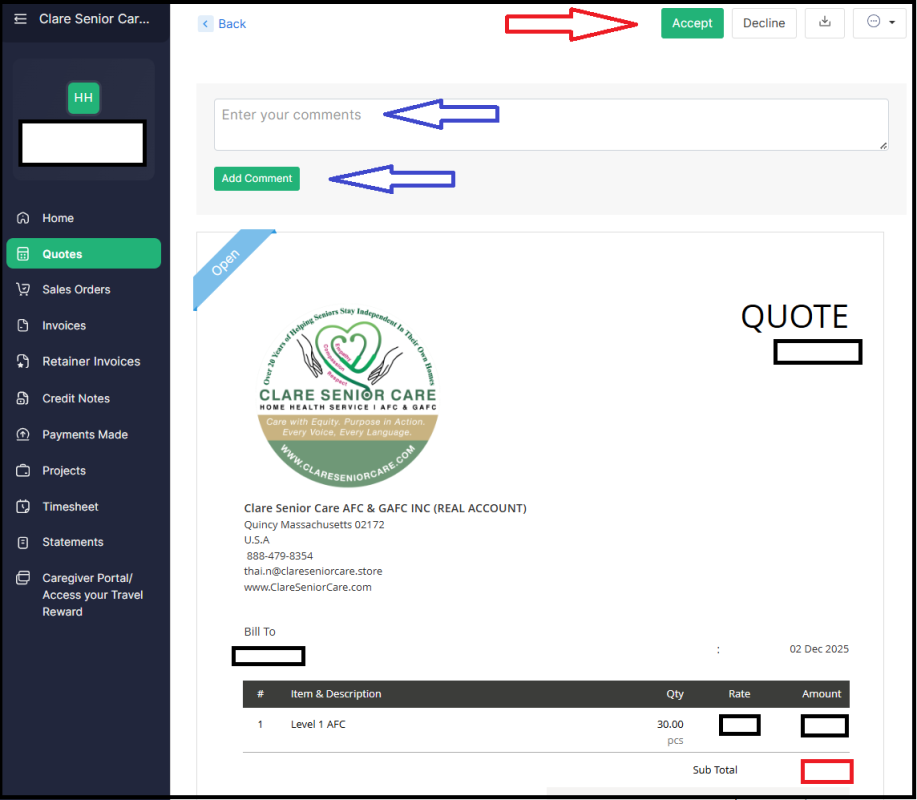
Click on the Quote you wish to process. After reviewing the details (days and amounts), you must choose one of the following:
* Click “Accept” if you agree with the payment amount.
* Click “Comment” if you need to request a change or clarify a discrepancy.
4. 💸 Payment Disbursement
Once the Quote is Accepted by the Caregiver, Clare Senior Care will proceed to deposit the confirmed amount directly into the bank account that the Caregiver has registered with Clare.
Have further question? Please Contact Us